Top 5 OpenAI Models Compared in 2026
Choosing the right AI model is one of the most important decisions you’ll make when building an AI-powered application. The model you select affects everything from response quality and speed to operating costs and user experience.
OpenAI offers a range of models designed for different needs. Some prioritize deep reasoning and complex problem-solving, while others focus on low latency, affordability, or efficient execution at scale. Rather than searching for a single “best” model, developers and businesses should look for the model that best matches their specific use case.
Whether you’re creating a customer support chatbot, coding assistant, content generation platform, AI search tool, or enterprise workflow automation system, understanding the strengths and trade-offs of each model can help you make better technical and business decisions.
In this guide, we’ll compare five of the most widely used OpenAI models, explain where each one excels, and provide practical recommendations for choosing the right model for your application.
Table of Contents
- Why Model Selection Matters
- Key Factors to Compare
- Top 5 OpenAI Models
- Performance Comparison
- Best Practices
- Frequently Asked Questions
- Final Thoughts
Why Choosing the Right Model Matters
It’s tempting to assume that the largest or most capable model is always the best choice. In reality, different applications have different priorities.
For example:
- A customer service chatbot may need fast responses and predictable costs.
- A legal research assistant may prioritize reasoning quality over speed.
- A mobile application may benefit from lightweight models that reduce latency.
- A large enterprise might optimize for scalability and operational efficiency.
Selecting the right model helps balance quality, performance, and cost while creating a better experience for users.
Key Factors to Compare
Before choosing a model, evaluate it across several dimensions.
Intelligence and Reasoning
Some models are better suited for complex tasks such as:
- Multi-step reasoning
- Strategic planning
- Technical analysis
- Code generation
- Mathematical problem solving
If your application frequently handles difficult questions, a more capable reasoning model may be the better choice.
Speed
Response time has a direct impact on user experience.
Applications such as:
- Live chat
- Customer support
- Interactive learning
- Voice assistants
often benefit from models that deliver answers quickly.
Cost Efficiency
OpenAI provides models with different pricing and performance profiles.
Businesses should consider:
- Expected request volume
- Average prompt length
- Average response size
- Monthly operating costs
- Growth projections
A smaller, faster model may be sufficient for many routine tasks, reducing costs without sacrificing user satisfaction.
Scalability
As applications grow, infrastructure demands increase.
Consider:
- Concurrent users
- Peak traffic
- API throughput
- Reliability
- Operational efficiency
Choosing the right model early can simplify scaling later.
Model 1: GPT-5
GPT-5 is OpenAI’s flagship general-purpose model, designed to handle a broad range of tasks with strong reasoning, instruction following, and multimodal capabilities.
For many organizations, GPT-5 serves as the default choice when quality and versatility are top priorities.
Key Strengths
- Advanced reasoning
- Strong instruction following
- High-quality writing
- Complex coding assistance
- Data analysis
- Multimodal support (depending on implementation)
- Reliable structured outputs
Best Use Cases
- Enterprise AI assistants
- Research and analysis
- Technical documentation
- Software development
- Business automation
- Customer support for complex inquiries
- Professional content creation
Advantages
- Excellent performance across diverse tasks
- Strong contextual understanding
- Flexible for many industries
- Suitable for production environments
Considerations
For simple or repetitive tasks, GPT-5 may provide more capability than necessary. Organizations should evaluate whether a smaller model can meet their requirements more cost-effectively.
Model 2: GPT-5 mini
GPT-5 mini is designed to deliver a strong balance of intelligence, speed, and efficiency. It offers many of the capabilities of larger models while reducing latency and operational costs.
This makes it an attractive option for businesses that process large numbers of requests every day.
Key Strengths
- Fast responses
- Lower operational costs
- Strong general reasoning
- Effective content generation
- Good coding support
- High scalability
Best Use Cases
- Customer support chatbots
- Marketing automation
- Internal productivity tools
- Educational platforms
- SaaS applications
- AI writing assistants
Advantages
- Excellent price-to-performance ratio
- Lower latency
- Suitable for high-volume workloads
- Easy deployment across many business scenarios
Considerations
Although GPT-5 mini performs well across most common tasks, applications involving highly specialized reasoning or the most demanding analytical work may benefit from using the flagship GPT-5 model.
Quick Comparison
Feature GPT-5 GPT-5 mini
Overall intelligence Excellent Very Good
Speed Fast Faster
Cost efficiency Good Excellent
Complex reasoning Excellent Very Good
High-volume deployments Very Good Excellent
Enterprise applications Excellent Excellent
Which Model Should You Start With?
If your application requires maximum reasoning capability, sophisticated analysis, or premium content quality, GPT-5 is an excellent starting point.
If your priority is serving many users efficiently while maintaining strong performance, GPT-5 mini often provides the best balance between quality and cost.
The right choice ultimately depends on your workload, performance expectations, and budget rather than on model size alone.
Key Takeaways
The first two models illustrate an important principle: the most capable model isn’t always the most practical one.
- GPT-5 is ideal for complex reasoning, enterprise applications, and high-quality outputs.
- GPT-5 mini delivers an outstanding balance of performance, speed, and affordability, making it a strong choice for many production workloads.
Understanding these trade-offs will help you build AI applications that meet both technical and business objectives.
Part 2: GPT-5 nano, GPT-4.1 & o4-mini
The first two models—GPT-5 and GPT-5 mini—cover many general-purpose AI workloads. However, not every application requires the highest level of reasoning or the same balance of performance and cost.
OpenAI also offers models optimized for lightweight tasks, legacy compatibility, and efficient reasoning. Understanding these differences helps developers and businesses build AI applications that are both effective and cost-efficient.
Model 3: GPT-5 nano
GPT-5 nano is OpenAI’s fastest and most lightweight GPT-5 model. It is designed for applications that need very low latency, high throughput, and efficient processing of simple, repetitive tasks.
Rather than replacing larger models, GPT-5 nano complements them by handling workloads where speed and scale matter more than advanced reasoning.
Key Strengths
- Extremely fast response times
- Low operational costs
- Efficient for high-volume workloads
- Optimized for routine AI tasks
- Scalable for large deployments
Best Use Cases
- FAQ chatbots
- Form completion
- Text classification
- Content tagging
- Auto-suggestions
- Customer routing
- Data extraction
- Basic summarization
Advantages
- Excellent speed
- Lower infrastructure costs
- Handles large request volumes efficiently
- Ideal for background automation
Considerations
GPT-5 nano is not intended for complex reasoning, advanced coding, or detailed strategic analysis. Applications requiring deep understanding should use GPT-5 or GPT-5 mini instead.
Model 4: GPT-4.1
GPT-4.1 remains a valuable option for organizations that have existing workflows built around the GPT-4 family or require compatibility with established integrations.
Many businesses continue to use GPT-4.1 while gradually adopting newer GPT-5 models.
Key Strengths
- Mature ecosystem
- Reliable text generation
- Strong coding capabilities
- Stable enterprise deployments
- Broad SDK and tooling support
Best Use Cases
- Existing enterprise applications
- Legacy chatbot systems
- Documentation generation
- Programming assistance
- Internal business tools
- Knowledge management
Advantages
- Proven production reliability
- Familiar developer experience
- Easy migration path
- Extensive documentation
Considerations
For entirely new projects, developers should evaluate GPT-5 models first, as they generally provide stronger instruction following, broader capabilities, and a more future-oriented foundation.
Model 5: o4-mini
o4-mini is a reasoning-focused model designed to perform well on tasks that require careful analysis, logical thinking, coding, and mathematical problem solving while remaining efficient enough for many production environments.
It is particularly useful when applications need dependable reasoning without always using the largest flagship model.
Key Strengths
- Strong logical reasoning
- Excellent coding support
- Mathematical problem solving
- Structured analysis
- Good balance between capability and efficiency
Best Use Cases
- Programming assistants
- STEM education
- Technical support
- Workflow planning
- Data interpretation
- Business analysis
- Engineering applications
Advantages
- Strong reasoning performance
- Effective for technical workloads
- Faster than larger reasoning models in many scenarios
- Suitable for enterprise workflows
Considerations
While o4-mini excels at analytical tasks, GPT-5 remains the more versatile choice for organizations that need a single model capable of handling a broad range of creative, conversational, and multimodal workloads.
Comparing Models by Use Case
Business Need Recommended Model
General AI assistant GPT-5
High-volume chatbot GPT-5 mini
Lightweight automation GPT-5 nano
Existing GPT-4 applications GPT-4.1
Coding and analytical tasks o4-mini
Performance Comparison
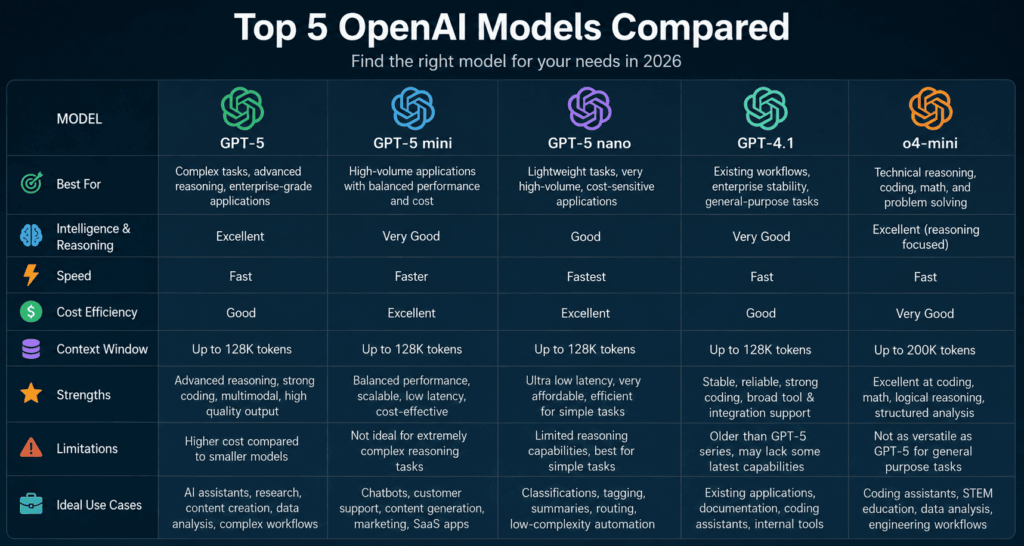
Feature GPT-5 GPT-5 mini GPT-5 nano GPT-4.1 o4-mini
Overall intelligence Excellent Very Good Good Very Good Excellent (reasoning)
Speed Fast Faster Excellent Fast Fast
Cost efficiency Good Excellent Excellent Good Very Good
Coding Excellent Very Good Good Very Good Excellent
Complex reasoning Excellent Very Good Basic Very Good Excellent
Enterprise deployment Excellent Excellent Very Good Excellent Excellent
Which Model Fits Your Project?
Selecting a model should be based on your application’s goals rather than choosing the most powerful option available.
Choose GPT-5 if you need:
- Premium content generation
- Advanced reasoning
- Enterprise AI assistants
- High-quality analysis
- Complex workflows
Choose GPT-5 mini if you need:
- Balanced performance
- Fast customer support
- Marketing automation
- Productivity tools
- Large-scale SaaS deployments
Choose GPT-5 nano if you need:
- Very low latency
- High request volumes
- Simple automation
- Cost-efficient AI features
Choose GPT-4.1 if you need:
- Compatibility with existing systems
- Stable enterprise deployments
- Gradual migration to newer models
Choose o4-mini if you need:
- Technical reasoning
- Coding assistance
- Engineering workflows
- Mathematical analysis
- Structured problem solving
Key Takeaways
The remaining three models round out OpenAI’s portfolio by serving specialized needs:
- GPT-5 nano focuses on speed, efficiency, and high-volume automation.
- GPT-4.1 remains a dependable choice for organizations maintaining existing integrations.
- o4-mini excels in reasoning-intensive applications such as coding, mathematics, and technical analysis.
Together with GPT-5 and GPT-5 mini, these models give developers the flexibility to optimize for intelligence, speed, cost, or reasoning based on the needs of each application
Part 3: How to Choose the Right Model, Best Practices & FAQs
Selecting an AI model isn’t just a technical decision—it’s a business decision. The right model should align with your application’s goals, user expectations, budget, and long-term growth strategy.
Rather than asking, “Which model is the best?” it’s more helpful to ask, “Which model is the best fit for this specific task?”
This section will help you make that decision with confidence.
Choosing the Right Model by Industry
Different industries have different AI requirements. Here’s how OpenAI models can fit common business scenarios.
Software and SaaS
Software companies often need AI for chatbots, documentation, coding assistance, and workflow automation.
Recommended models:
- GPT-5 for premium AI features
- GPT-5 mini for customer-facing assistants
- o4-mini for technical reasoning and developer tools
E-commerce
Online retailers frequently use AI for:
- Product descriptions
- Customer support
- Personalized recommendations
- Email marketing
- FAQ automation
Recommended models:
- GPT-5 mini
- GPT-5 nano for high-volume customer interactions
Education
Educational platforms benefit from AI-powered tutoring, lesson planning, quiz generation, and personalized learning support.
Recommended models:
- GPT-5
- o4-mini for STEM and technical subjects
Healthcare
Healthcare organizations can use AI to assist with administrative documentation, patient communication drafts, and internal knowledge retrieval, while keeping qualified professionals responsible for clinical decisions.
Recommended models:
- GPT-5
- GPT-5 mini
Financial Services
Banks, insurance companies, and financial institutions often use AI for document summarization, customer support, and workflow automation.
Recommended models:
- GPT-5
- o4-mini for structured analysis
Performance vs. Cost
A common misconception is that using the most capable model always produces the best outcome.
In practice, many organizations reduce costs by matching the model to the complexity of the task.
Example Strategy
- Use GPT-5 for complex customer requests and detailed analysis.
- Use GPT-5 mini for everyday conversations and content creation.
- Use GPT-5 nano for simple classification, tagging, and routine automation.
- Use o4-mini for technical reasoning and coding-heavy workflows.
This layered approach can improve both performance and operational efficiency.
Best Practices for Production Applications
Start with a Pilot Project
Before deploying AI across an organization, begin with a single, well-defined use case. This allows teams to measure value, gather feedback, and refine workflows before scaling.
Measure Business Outcomes
Track metrics that matter to your organization, such as:
- Customer satisfaction
- Response times
- Productivity improvements
- Time saved
- Cost reductions
- User engagement
- Task completion rates
Regular measurement helps demonstrate return on investment and identify areas for improvement.
Optimize Prompts
Well-designed prompts improve consistency and reduce unnecessary API usage.
Include:
- Clear objectives
- Relevant context
- Output format
- Constraints
- Examples when appropriate
Prompt refinement is an ongoing process that can significantly improve application quality.
Validate AI Responses
AI outputs should be reviewed before being used for high-impact tasks.
Examples include:
- Legal documents
- Financial reports
- Medical communications
- Customer-facing announcements
- Regulatory content
Human oversight remains essential for accuracy and accountability.
Monitor and Improve
Successful AI systems evolve over time.
Monitor:
- API latency
- Error rates
- Token usage
- User feedback
- Cost trends
- Model performance
Use this information to adjust prompts, choose more appropriate models, or redesign workflows as needed.
Common Mistakes to Avoid
Organizations new to AI often encounter similar challenges. Avoid these common pitfalls:
- Choosing the largest model for every task, even when a smaller model is sufficient.
- Ignoring latency and user experience.
- Failing to review AI-generated outputs.
- Sending excessive context with every request.
- Overlooking security and access controls.
- Not testing prompts with real users.
- Assuming one model will perform equally well across every use case.
- Skipping monitoring after deployment.
Careful planning and continuous improvement are key to long-term success.
Frequently Asked Questions
Which OpenAI model is best overall?
There isn’t a single best model for every scenario. GPT-5 is the most versatile option, while GPT-5 mini, GPT-5 nano, GPT-4.1, and o4-mini each offer advantages for specific workloads.
Which model is best for startups?
Many startups begin with GPT-5 mini because it balances performance, speed, and cost. As requirements evolve, they may introduce GPT-5 for more advanced tasks.
Which model is best for coding?
For many software development workflows, GPT-5 and o4-mini are strong choices due to their reasoning and programming capabilities.
Should I migrate from GPT-4.1?
If you’re building a new application, evaluate GPT-5 models first. If you have an existing production system using GPT-4.1, consider a gradual migration plan that includes testing for quality, performance, and cost.
Can I use multiple models in one application?
Yes. Many production systems route different tasks to different models based on complexity, latency requirements, and budget.
Final Comparison
Model Best For Primary Strength
GPT-5 Complex AI applications Advanced reasoning and versatility
GPT-5 mini High-volume production apps Balance of quality, speed, and cost
GPT-5 nano Lightweight automation Speed and efficiency
GPT-4.1 Existing enterprise systems Stability and compatibility
o4-mini Coding and analytical workflows Strong technical reasoning
Final Thoughts
OpenAI’s model lineup gives developers and businesses the flexibility to choose the right balance of intelligence, speed, cost, and specialization for each project.
Rather than relying on a single model for every task, many successful teams build layered AI architectures that combine multiple models. For example, lightweight models can handle routine requests, while more capable models are reserved for complex reasoning or high-value interactions.
This approach helps organizations improve user experience, control costs, and scale more effectively as demand grows.
As AI technology continues to evolve, the most successful implementations will focus on measurable business outcomes, thoughtful prompt design, strong security practices, and ongoing optimization. By understanding the strengths of each OpenAI model, you can build applications that are not only more capable but also more efficient and easier to maintain over time.
