
Artificial intelligence has become a core part of modern software development. From intelligent chatbots and AI-powered search engines to voice assistants and content generation tools, developers are integrating AI into applications at an unprecedented pace.
OpenAI has played a significant role in this shift by providing APIs that make advanced AI models accessible through simple HTTP requests. Instead of building machine learning models from scratch, developers can use OpenAI’s APIs to add powerful AI capabilities to web applications, mobile apps, enterprise software, and internal business tools.
Whether you’re building a SaaS platform, automating workflows, creating developer tools, or launching an AI startup, understanding the OpenAI API ecosystem can help you choose the right services for your project.
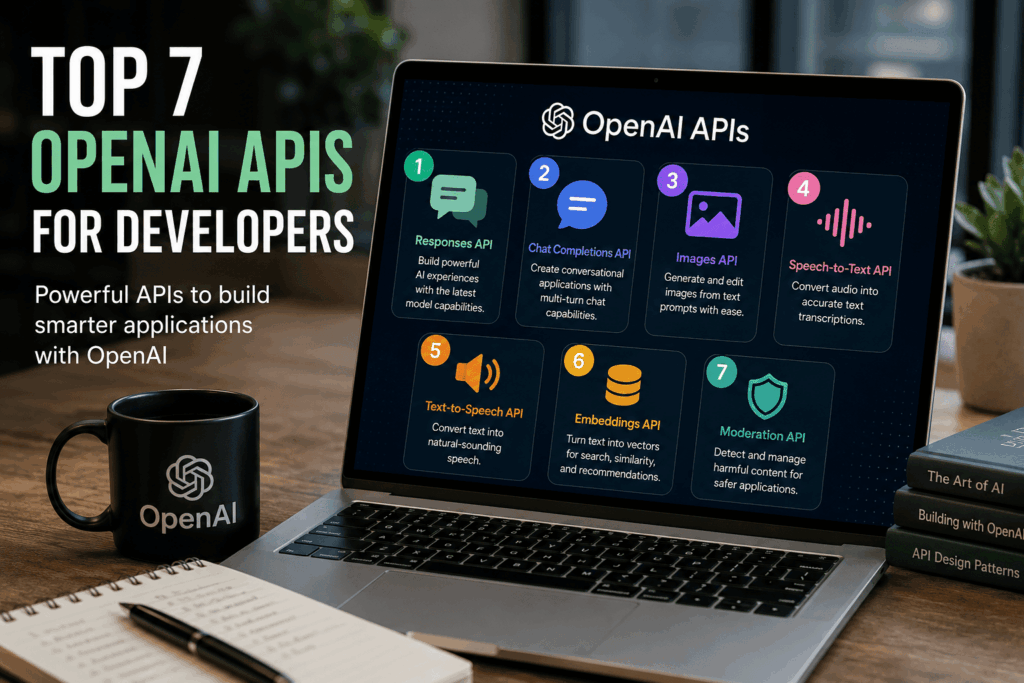
In this guide, we’ll explore the seven most important OpenAI APIs available today, explain how they work, discuss their strengths and limitations, and provide practical examples of where they fit into real-world applications.
Table of Contents
- Why OpenAI APIs Matter
- How to Choose the Right API
- Top 7 OpenAI APIs
- Best Practices
- Common Mistakes
- Frequently Asked Questions
- Final Thoughts
Why Developers Use OpenAI APIs
Building sophisticated AI systems traditionally required large datasets, specialized machine learning expertise, and significant computing resources. OpenAI’s APIs abstract away much of that complexity, allowing developers to focus on creating useful applications rather than training and maintaining models.
Some of the most common reasons developers integrate OpenAI APIs include:
- Building AI chatbots and virtual assistants
- Automating customer support
- Generating marketing and technical content
- Summarizing documents
- Creating AI-powered search experiences
- Developing coding assistants
- Transcribing audio
- Generating speech from text
- Producing custom images
- Moderating user-generated content
Because these APIs are cloud-based, developers can quickly prototype ideas and scale successful applications without managing complex AI infrastructure.
How to Choose the Right OpenAI API
Different APIs are optimized for different tasks. Before integrating one into your application, consider the following factors.
Your Primary Use Case
Ask yourself what problem you’re solving.
Examples include:
- Conversational AI
- Content generation
- Image creation
- Voice recognition
- Speech synthesis
- Semantic search
- Safety and moderation
Choosing the API that best matches your use case leads to better performance and a simpler architecture.
Performance Requirements
Consider:
- Expected response time
- Accuracy
- Throughput
- Scalability
- Streaming support
Applications like customer support chatbots often require low latency, while document analysis tools may prioritize output quality over speed.
Cost Considerations
Most OpenAI APIs use usage-based pricing. Before launching a production application, estimate:
- Monthly request volume
- Average prompt size
- Average response size
- Expected growth
- Budget constraints
Optimizing prompts and caching responses where appropriate can help reduce operational costs.
Security and Privacy
If your application processes sensitive information, review:
- Data handling policies
- Authentication
- Access controls
- Logging practices
- Compliance requirements
Always follow your organization’s security policies and avoid sending unnecessary sensitive data to external services.
API #1: Responses API
The Responses API is OpenAI’s primary interface for building AI-powered applications. It provides a unified way to work with modern OpenAI models and supports a wide range of capabilities, including text generation, structured outputs, tool use, multimodal inputs, and streaming responses.
For most new projects, this is the recommended API because it simplifies development while providing access to the latest model capabilities.
Key Features
- Unified API for modern AI interactions
- Text generation and editing
- Structured JSON outputs
- Function and tool calling
- Streaming responses
- Support for multimodal workflows (where supported by the selected model)
- Better extensibility for future capabilities
Best For
- AI assistants
- SaaS applications
- Enterprise software
- Workflow automation
- Document processing
- Customer support systems
- Productivity tools
Real-World Use Cases
AI Customer Support
Create assistants that answer customer questions, summarize conversations, and route requests to the appropriate teams.
Business Automation
Generate reports, classify support tickets, extract structured information from documents, or automate repetitive office tasks.
Developer Tools
Power AI features inside IDEs, documentation platforms, and internal engineering tools.
Advantages
- Modern, flexible API design
- Supports multiple interaction patterns
- Simplifies future upgrades
- Suitable for both prototypes and production systems
Considerations
Developers should design prompts carefully, validate outputs, and implement error handling to ensure reliable application behavior.
API #2: Chat Completions API
The Chat Completions API introduced a conversational format that became widely adopted across the AI ecosystem. While many new projects are encouraged to use the newer Responses API, the Chat Completions API remains relevant for maintaining existing integrations and applications.
Many developers continue to use it because of its maturity and extensive ecosystem support.
Key Features
- Role-based conversation structure
- Multi-turn chat
- System instructions
- Streaming responses
- Broad SDK support
- Familiar developer workflow
Best For
- Existing chatbot applications
- AI customer service
- Educational assistants
- Internal business tools
- Migration projects
Real-World Use Cases
Virtual Assistants
Create conversational experiences for websites, mobile apps, or employee portals.
Help Desk Automation
Answer common support questions before escalating to human agents.
Interactive Learning
Build tutoring systems that provide explanations, quizzes, and personalized feedback.
Advantages
- Simple conversational format
- Extensive documentation and community examples
- Easy integration into existing projects
Considerations
For greenfield projects, developers should evaluate the Responses API first, as it is designed to support newer capabilities and future enhancements more naturally.
Comparing the First Two APIs
Feature Responses API Chat Completions API
Recommended for new projects ✅ Yes Primarily for existing integrations
Text generation ✅ ✅
Tool calling ✅ Supported in many scenarios
Structured outputs ✅ More limited
Streaming ✅ ✅
Future extensibility Excellent Good
For most developers starting a new application today, the Responses API provides a more flexible foundation. However, the Chat Completions API remains a practical option when maintaining or extending legacy systems.
Key Takeaways
The first two APIs represent the core of OpenAI’s developer platform.
Responses API is the recommended choice for most new AI applications because it offers a unified, extensible interface with support for modern capabilities.
Chat Completions API continues to be valuable for existing conversational applications and teams maintaining established codebases.
Understanding when to use each API helps you design applications that are easier to maintain, scale, and evolve as OpenAI’s platform continues to grow.Part 2: APIs 3–5
The first two APIs covered the foundation of OpenAI’s developer platform for conversational AI. In this section, we’ll explore three specialized APIs that enable developers to build visual, voice-enabled, and accessibility-focused applications.
These APIs allow developers to move beyond text and create richer user experiences across web, mobile, desktop, and enterprise applications.
API #3: Images API
Visual content has become an essential part of modern applications. Whether you’re building a design platform, marketing tool, educational app, or e-commerce solution, the ability to generate or edit images with AI can significantly enhance the user experience.
The Images API enables developers to create original images from text prompts and perform image editing tasks within their applications.
Key Features
- Generate images from natural language prompts
- Edit existing images
- Create multiple image variations
- High-quality image generation
- Support for realistic and artistic styles
- API-based integration for web and mobile apps
Best For
- Marketing platforms
- Graphic design tools
- Content creation software
- E-commerce businesses
- Creative agencies
- Educational platforms
- Game development
Common Use Cases
Marketing Graphics
Automatically generate blog illustrations, social media graphics, advertising visuals, and promotional banners.
Product Mockups
Create early product concepts before investing in professional design work.
Creative Applications
Enable users to generate artwork, illustrations, characters, environments, or concept designs using simple text prompts.
Educational Content
Generate custom diagrams, classroom illustrations, and visual learning materials tailored to specific lessons.
Advantages
- Fast image generation
- Highly customizable prompts
- Scalable through API integration
- Reduces reliance on stock imagery
Considerations
Image quality depends heavily on prompt clarity. Developers should also implement moderation and review workflows where users can generate public-facing content.
API #4: Speech-to-Text API
Voice is becoming an increasingly popular interface for digital products. The Speech-to-Text API converts spoken audio into written text, enabling applications to understand voice input and process conversations.
Rather than manually transcribing recordings, developers can automate transcription for meetings, customer support calls, interviews, podcasts, and more.
Key Features
- Accurate speech recognition
- Multilingual transcription
- Support for multiple audio formats
- API integration for web and mobile applications
- Suitable for both short and long recordings
Best For
- Customer support software
- Meeting assistants
- Healthcare documentation
- Podcast platforms
- Journalism tools
- Educational applications
Common Use Cases
Meeting Transcriptions
Automatically convert meetings into searchable notes that teams can review later.
Customer Support
Transcribe customer calls for training, quality assurance, and compliance purposes.
Podcast Publishing
Convert audio episodes into blog posts, captions, or searchable transcripts.
Accessibility
Provide text alternatives for spoken content, making applications more accessible to a wider audience.
Advantages
- Eliminates manual transcription
- Improves productivity
- Supports multilingual applications
- Easy integration into existing workflows
Considerations
Audio quality significantly impacts transcription accuracy. Background noise, overlapping speakers, and poor recording equipment can reduce performance.
API #5: Text-to-Speech API
The Text-to-Speech API transforms written content into natural-sounding speech, making applications more interactive and accessible.
Instead of relying on robotic voice synthesis, developers can deliver spoken responses that feel smoother and more engaging.
Key Features
- Natural-sounding AI voices
- Multiple voice options
- Low-latency speech generation
- API-based integration
- Suitable for real-time applications
- High-quality audio output
Best For
- AI assistants
- Customer service bots
- Accessibility software
- Language learning apps
- Navigation systems
- Audiobook generation
- Smart devices
Common Use Cases
Virtual Assistants
Allow users to hear AI responses instead of reading them, creating a more conversational experience.
Accessibility
Help visually impaired users interact with applications through spoken content.
Language Learning
Provide accurate pronunciation examples for students learning new languages.
Customer Service
Enable automated phone systems and voice assistants to communicate more naturally with callers.
Advantages
- Improves user experience
- Enhances accessibility
- Supports hands-free interaction
- Creates more engaging AI applications
Considerations
When selecting voices, developers should consider factors such as clarity, tone, speaking speed, and the expectations of their target audience.
Combining These APIs in Real Applications
One of the strengths of OpenAI’s platform is that multiple APIs can work together within the same application.
Example 1: AI Customer Support Platform
A customer support solution might use:
- Speech-to-Text API to transcribe incoming calls.
- Responses API to analyze the conversation and generate answers.
- Text-to-Speech API to read responses back to the customer.
This creates a fully voice-enabled support experience.
Example 2: Content Creation Platform
A content platform could:
- Generate blog images using the Images API.
- Create articles with the Responses API.
- Convert the article into audio using the Text-to-Speech API.
This enables users to publish written, visual, and audio content from a single workflow.
Example 3: Learning Application
An educational platform might:
- Use Speech-to-Text to evaluate spoken language exercises.
- Generate explanations with the Responses API.
- Read lessons aloud using Text-to-Speech.
- Create illustrations with the Images API.
This results in a richer and more engaging learning experience.
Best Practices for Production Applications
Before deploying these APIs, consider the following recommendations:
- Validate user input before sending requests.
- Optimize prompts for consistent outputs.
- Cache reusable responses where appropriate.
- Handle API errors gracefully.
- Monitor latency and usage.
- Implement moderation for user-generated content.
- Protect API keys and credentials.
- Test with real users before launching.
Building reliable AI applications involves more than calling an API—it requires thoughtful engineering, monitoring, and continuous improvement.
Key Takeaways
The Images API, Speech-to-Text API, and Text-to-Speech API expand what developers can build with OpenAI beyond text-based interactions.
Images API enables AI-powered visual content generation and editing.
Speech-to-Text API converts spoken language into searchable, editable text.
Text-to-Speech API creates natural-sounding voice experiences that improve accessibility and engagement.
Together with the Responses API, these services provide the building blocks for creating modern, multimodal AI applications that serve a wide range of industries and use cases.Part 3: APIs 6–7, Best Practices & Conclusion
By now, you’ve explored the core APIs for conversational AI, image generation, and voice applications. The final two APIs focus on helping developers build smarter search experiences and safer AI applications.
These APIs may not receive as much attention as chat or image generation, but they play an important role in production-ready AI systems.
API #6: Embeddings API
Many modern applications need more than keyword search. Users expect systems to understand meaning, context, and intent—even when they don’t use the exact words stored in a database.
The Embeddings API converts text into numerical vector representations that capture semantic meaning. These vectors can then be used to compare the similarity between pieces of content.
Instead of matching words, applications can match ideas.
Key Features
- Semantic search
- Document similarity
- Recommendation systems
- Content clustering
- Knowledge retrieval
- Duplicate detection
- Intelligent search indexing
Best For
- SaaS platforms
- Enterprise search
- Knowledge bases
- AI assistants
- Documentation portals
- E-learning platforms
- Customer support systems
Common Use Cases
AI-Powered Search
Help users find relevant documents even if they don’t know the exact wording.
Recommendation Engines
Recommend related articles, products, courses, or documentation based on semantic similarity.
Knowledge Management
Large organizations can make internal documentation easier to search by indexing documents using embeddings.
Retrieval-Augmented Generation (RAG)
Many AI applications combine embeddings with language models to retrieve relevant documents before generating responses. This helps provide more accurate, context-aware answers.
Advantages
- Better search relevance
- Improved knowledge discovery
- Faster information retrieval
- Supports large document collections
- Scalable for enterprise applications
Considerations
Embedding quality depends on the structure and quality of your data. Developers should also design efficient storage and retrieval systems for vector data.
API #7: Moderation API
As AI applications become more interactive, protecting users and maintaining safe environments is increasingly important.
The Moderation API helps developers identify potentially harmful or policy-violating content, making it easier to build applications that encourage respectful and responsible interactions.
Key Features
- Content safety classification
- Detection of potentially harmful content
- Automated moderation workflows
- Low-latency API responses
- Easy integration with chat applications
Best For
- Social platforms
- Community forums
- AI chatbots
- Customer support systems
- Educational platforms
- Gaming communities
- User-generated content websites
Common Use Cases
Chat Applications
Review user messages before displaying them or sending them to AI models.
Community Platforms
Automatically flag potentially problematic posts for moderator review.
AI Assistants
Apply moderation checks before presenting AI-generated responses to users.
Enterprise Applications
Support internal governance policies by screening submitted content.
Advantages
- Improves platform safety
- Reduces manual moderation workload
- Supports scalable content review
- Integrates easily into existing workflows
Considerations
Automated moderation should complement—not replace—human oversight, particularly for nuanced or high-impact decisions.
Which OpenAI API Should You Choose?
Choosing the right API depends on your application’s goals.
If you want to… Recommended API
Build an AI assistant Responses API
Maintain an existing chatbot Chat Completions API
Generate images Images API
Convert speech into text Speech-to-Text API
Convert text into speech Text-to-Speech API
Build semantic search Embeddings API
Moderate user content Moderation API
Many successful applications combine several APIs to deliver richer user experiences.
Best Practices for Developers
Whether you’re building a prototype or a production system, following these best practices can improve reliability, maintainability, and user experience.
Write Better Prompts
Clear prompts reduce ambiguity and improve response consistency.
Include:
- Objective
- Context
- Expected format
- Constraints
- Examples when helpful
Validate AI Outputs
AI-generated responses can occasionally contain inaccuracies or formatting issues.
Always validate outputs before:
- Saving to databases
- Sending emails
- Displaying critical information
- Triggering automated workflows
Optimize Costs
Usage-based pricing makes optimization important.
Helpful strategies include:
- Shorter prompts
- Limiting unnecessary context
- Caching reusable outputs
- Reducing duplicate requests
- Choosing the right model for the task
Protect API Keys
Never expose API keys in:
- Client-side JavaScript
- Mobile applications
- Public repositories
- Documentation examples
Instead, store credentials securely on your backend and rotate them regularly.
Monitor Performance
Track metrics such as:
- Latency
- Error rates
- Request volume
- Token usage
- User satisfaction
- API costs
Monitoring helps identify issues early and supports long-term scalability.
Common Developer Mistakes
Even experienced teams can run into avoidable problems. Here are some common pitfalls:
- Using the most capable model for every task, even when a smaller or faster model would suffice.
- Skipping validation of AI-generated responses.
- Sending excessive context with every request.
- Ignoring rate limits and retry logic.
- Failing to protect API credentials.
- Overlooking user privacy and data governance requirements.
- Neglecting prompt testing and refinement.
- Assuming AI responses are always factually correct.
Addressing these issues early can save time and improve application quality.
Frequently Asked Questions
Which OpenAI API is best for new applications?
For most new projects, the Responses API is the recommended starting point because it provides a unified interface for modern model capabilities.
Can I combine multiple APIs?
Yes. Many production applications use several APIs together. For example, a voice assistant might combine Speech-to-Text, the Responses API, and Text-to-Speech to create a conversational experience.
Do I need machine learning expertise?
No. While understanding AI concepts is helpful, OpenAI’s APIs are designed so that developers can integrate advanced AI features using familiar web technologies and standard API requests.
Which API is best for enterprise search?
The Embeddings API is commonly used to build semantic search and Retrieval-Augmented Generation (RAG) systems that help users find relevant information across large document collections.
How can I improve application safety?
Use the Moderation API alongside thoughtful application design, user reporting mechanisms, and human review processes where appropriate.
Final Thoughts
OpenAI’s APIs provide developers with a versatile toolkit for building modern AI applications. Whether you’re creating conversational assistants, intelligent search systems, voice-enabled products, creative tools, or enterprise software, there’s an API designed to support your goals.
The key to successful implementation is selecting the right combination of APIs, writing clear prompts, validating outputs, and continuously monitoring performance in production.
As AI technology continues to evolve, developers who understand these core APIs will be well-positioned to build applications that are more intelligent, efficient, and valuable for users.
Rather than treating AI as a standalone feature, think of it as a platform capability that can enhance every part of your product—from customer support and content creation to search, accessibility, automation, and decision support. With thoughtful implementation and ongoing refinement, OpenAI’s APIs can become a powerful foundation for the next generation of software.
