
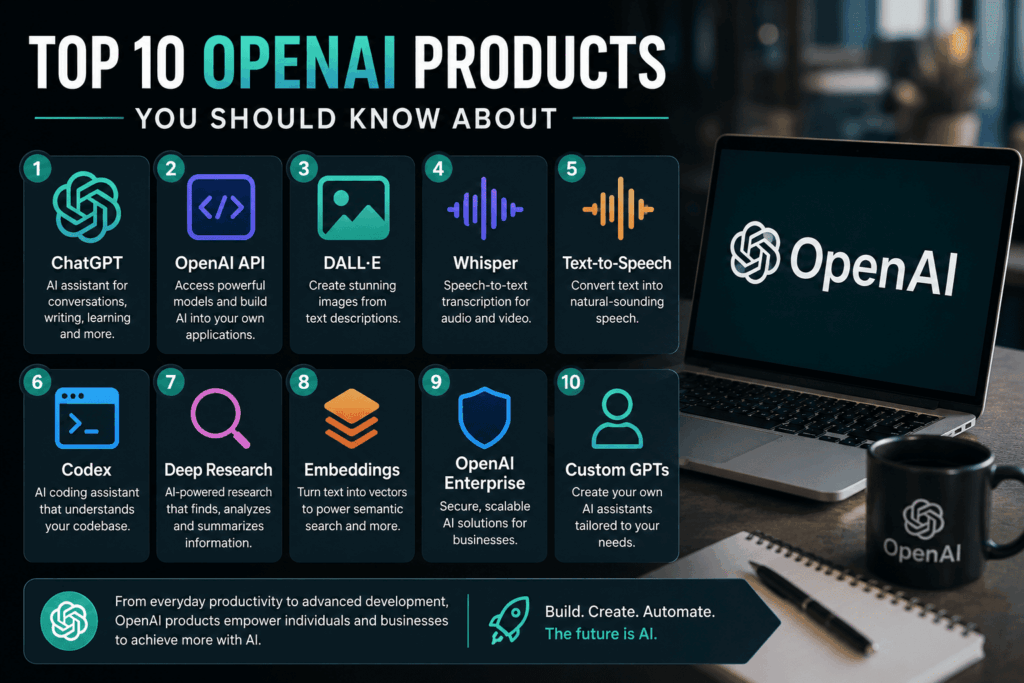
Artificial intelligence has rapidly evolved from a niche technology into an essential tool for businesses, developers, educators, creators, and everyday consumers. Whether you’re writing content, building software, generating images, analyzing data, or automating customer support, AI is changing how work gets done.
Among the companies leading this transformation, OpenAI has become one of the most influential names in the industry. Its products are used by millions of people every day—from students seeking help with homework to Fortune 500 companies integrating AI into their products and workflows.
What makes OpenAI’s ecosystem stand out is its versatility. Instead of offering a single AI application, OpenAI provides a growing suite of products and services that address a wide range of use cases. Some are designed for casual users, while others empower developers and enterprises to build AI-powered applications at scale.
In this guide, we’ll explore ten of the most important OpenAI products available today. You’ll learn what each product does, who it’s best suited for, its standout features, practical use cases, and how it fits into the broader AI landscape.
Whether you’re a business owner, software developer, marketer, educator, or simply curious about AI, this guide will help you understand which OpenAI products are worth exploring.
Table of Contents
- Why OpenAI Products Matter
- How to Choose the Right OpenAI Product
- Top 10 OpenAI Products
- Best Practices
- Frequently Asked Questions
- Final Thoughts
Why OpenAI Products Matter
AI is no longer limited to research labs or large technology companies. Today, organizations of all sizes are using AI to solve practical problems, improve productivity, and deliver better customer experiences.
OpenAI’s products are designed to make advanced AI capabilities more accessible. Depending on your needs, you can use them to:
- Draft emails, reports, and articles.
- Summarize lengthy documents.
- Generate images from text descriptions.
- Build AI-powered applications.
- Create voice-enabled experiences.
- Translate and rewrite content.
- Analyze data.
- Assist with programming tasks.
- Automate repetitive workflows.
- Enhance customer support.
Instead of replacing human expertise, these tools are most effective when used to augment creativity, decision-making, and efficiency.
Who Should Use OpenAI Products?
One of the strengths of OpenAI’s ecosystem is that it serves a broad range of users.
Business Owners
Businesses can streamline operations, improve customer service, generate marketing content, and support decision-making with AI-powered tools.
Developers
Developers can integrate OpenAI’s models into websites, mobile apps, SaaS platforms, internal tools, and customer-facing products using APIs.
Marketing Teams
Marketing professionals can accelerate content creation, brainstorm campaign ideas, improve SEO, write ad copy, and personalize customer communications.
Educators and Students
AI can support lesson planning, tutoring, research, writing assistance, and language learning when used responsibly.
Creative Professionals
Designers, writers, filmmakers, and content creators can use OpenAI’s tools to generate ideas, create visuals, refine copy, and explore new creative workflows.
How to Choose the Right OpenAI Product
With several products available, choosing the right one depends on your goals. Consider the following factors:
Your Primary Use Case
Ask yourself what you’re trying to accomplish.
For example:
- Do you need help writing content?
- Are you building an AI-powered application?
- Do you want to generate images?
- Are you creating voice assistants?
- Do you need enterprise-scale AI solutions?
Identifying your primary objective makes it easier to select the most appropriate product.
Technical Expertise
Some OpenAI products are designed for everyday users with little or no technical background, while others require programming knowledge.
For example:
- ChatGPT is easy to use through a conversational interface.
- APIs are intended for developers integrating AI into software.
- Enterprise tools may involve collaboration between technical and business teams.
Choose a product that aligns with your team’s skills and resources.
Budget
OpenAI offers a mix of free, subscription-based, and usage-based pricing models.
When evaluating a product, consider:
- Monthly subscription costs.
- API usage charges.
- Team licensing needs.
- Expected return on investment.
- Scalability as your usage grows.
A clear understanding of pricing helps you plan for long-term adoption.
Privacy and Security
Organizations handling sensitive information should evaluate:
- Data governance requirements.
- Access controls.
- Compliance obligations.
- User permissions.
- Enterprise security features.
Selecting the right plan and configuring it appropriately can help support your organization’s privacy and security needs.
What You’ll Learn in This Guide
The following sections introduce ten OpenAI products that serve different audiences and use cases.
For each product, you’ll discover:
- What it is.
- Key features.
- Who should use it.
- Common applications.
- Advantages.
- Considerations before adoption.
By the end of this guide, you’ll have a clearer understanding of how these products fit into modern AI workflows and which ones are most relevant to your personal or professional goals.
Before We Begin
AI technology continues to evolve rapidly, and OpenAI regularly introduces updates and new capabilities. Features, availability, and pricing may change over time.
Rather than focusing solely on technical specifications, this guide emphasizes practical value—helping you understand how each product can solve real-world problems and improve productivity.
In the next section, we’ll explore the first three OpenAI products, starting with the company’s best-known offering: ChatGPT.Part 2: Products 1–3
OpenAI has expanded far beyond a single chatbot. Today, its ecosystem includes conversational AI, developer platforms, image generation, voice technology, and enterprise solutions. In this section, we’ll explore the first three products that have had the biggest impact on businesses and individual users alike.
1. ChatGPT
ChatGPT is OpenAI’s flagship AI assistant and the product most people associate with the company. It enables users to interact with advanced AI through natural conversations, making it one of the easiest ways to experience generative AI.
Whether you’re drafting emails, writing code, brainstorming ideas, analyzing documents, or learning a new skill, ChatGPT can adapt to a wide range of tasks.
Key Features
- Natural conversational interface
- Content writing and editing
- Research assistance
- Coding support
- Document summarization
- Data analysis capabilities
- Image understanding (for supported models)
- Voice conversations (supported plans and devices)
- Custom GPT creation
- Project and workflow organization
Best For
- Students
- Business owners
- Marketing teams
- Writers
- Software developers
- Customer support teams
- Researchers
- Freelancers
Common Use Cases
Content Creation
Generate blog posts, product descriptions, newsletters, social media captions, and marketing campaigns more efficiently.
Programming Assistance
Developers use ChatGPT to explain code, troubleshoot errors, generate boilerplate code, and accelerate software development.
Business Productivity
Professionals use ChatGPT to summarize meetings, draft reports, create presentations, and organize information.
Learning
Students and lifelong learners can explore new topics, practice languages, and receive explanations tailored to their level of understanding.
Advantages
- Beginner-friendly interface
- Wide range of capabilities
- Supports multiple file types in many workflows
- Saves time on repetitive tasks
- Regular feature updates
Considerations
While ChatGPT is highly capable, users should still verify important facts, especially for legal, medical, financial, or rapidly changing topics. Human review remains essential for high-stakes decisions.
2. OpenAI API
While ChatGPT is designed for end users, the OpenAI API gives developers access to the same family of AI models so they can build intelligent applications and automate workflows.
Instead of using AI manually through a chat interface, developers can integrate AI directly into websites, mobile apps, software platforms, customer service tools, and internal business systems.
Key Features
- Text generation
- Structured output
- Image generation
- Speech-to-text
- Text-to-speech
- Embeddings for semantic search
- Function and tool calling
- Streaming responses
- Fine-grained developer controls
Best For
- Software companies
- SaaS platforms
- Mobile app developers
- Enterprise software
- AI startups
- Internal business tools
Common Use Cases
AI Customer Support
Build virtual assistants that answer customer questions around the clock.
Workflow Automation
Automatically summarize documents, categorize support tickets, generate reports, or extract structured information.
AI Features Inside Apps
Many modern applications now include AI-powered writing assistants, coding helpers, search features, and intelligent recommendations powered by APIs.
Knowledge Search
Organizations use embeddings and retrieval techniques to help employees search internal documentation more efficiently.
Advantages
- Highly flexible
- Scales from prototypes to enterprise applications
- Supports multiple AI capabilities through one platform
- Suitable for custom integrations
Considerations
Using the API requires programming knowledge or access to developers. Costs are generally based on usage, so teams should monitor consumption and optimize requests.
3. OpenAI Image Generation
Creating original visuals traditionally required graphic design skills or stock photography. OpenAI’s image generation capabilities make it possible to create custom images from natural language descriptions.
Designers, marketers, educators, and creators can quickly produce illustrations, concept art, marketing graphics, product mockups, and creative visuals.
Key Features
- Generate images from text prompts
- Edit existing images
- Create multiple design variations
- High-quality image generation
- Support for a wide range of artistic and realistic styles
Best For
- Marketing teams
- Content creators
- Designers
- Bloggers
- Small businesses
- Advertising agencies
- Educators
Common Use Cases
Marketing Campaigns
Create custom visuals for blogs, social media, digital advertisements, and email campaigns without relying entirely on stock images.
Product Concepts
Generate early-stage product mockups and design ideas before investing in full production.
Educational Materials
Teachers and trainers can create diagrams, illustrations, and visual aids tailored to specific lessons.
Creative Projects
Artists and storytellers can rapidly explore concepts, characters, environments, and visual styles.
Advantages
- Fast content creation
- Highly customizable
- Encourages creative exploration
- Reduces dependence on generic stock imagery
- Considerations
The quality of generated images depends heavily on the clarity of the prompt. Users should also review outputs carefully to ensure they align with branding, accessibility, and intended use.
How These Three Products Work Together
Although each product serves a different purpose, they often complement one another in real-world workflows.
For example, a marketing team might:
Use ChatGPT to brainstorm a campaign and write blog content.
Use image generation to create custom visuals for the campaign.
Use the OpenAI API to integrate AI-powered customer support into their website.
Similarly, a software company could:
- Prototype ideas with ChatGPT.
- Build AI functionality using the API.
- Generate marketing assets with image generation.
By combining these tools, organizations can streamline content creation, product development, and customer engagement.
Key Takeaways
The first three OpenAI products form the foundation of the company’s ecosystem:
ChatGPT provides an accessible AI assistant for everyday productivity, creativity, and learning.
OpenAI API enables developers to build AI-powered applications and automate business processes.
Image Generation helps creators and businesses produce original visuals quickly and efficiently.
Each product addresses different needs, but together they demonstrate how OpenAI’s technologies can support individuals, teams, and organizations across a wide range of industries.Part 3: Products 4–7
The first three products introduced OpenAI’s core ecosystem for conversational AI, developer integrations, and image generation. In this section, we’ll explore four more products and capabilities that help businesses build voice experiences, accelerate software development, and conduct more efficient research.
4. Speech-to-Text
Voice has become a major part of how people interact with technology. From customer service calls to meeting recordings and podcasts, spoken content is everywhere. OpenAI’s Speech-to-Text capabilities convert audio into accurate, searchable text that can be used in applications and workflows.
Developers can integrate speech recognition into websites, mobile apps, and enterprise systems to automate transcription and voice-driven experiences.
Key Features
- Audio transcription
- Multilingual speech recognition
- Timestamp support (where applicable)
- Noise-tolerant transcription
- Integration through the OpenAI API
- Support for multiple audio formats
Best For
- Customer support teams
- Media companies
- Journalists
- Healthcare documentation
- Legal professionals
- Meeting transcription
- Podcast creators
Common Use Cases
Meeting Notes
Automatically transcribe team meetings so employees can review discussions without taking detailed notes.
Customer Support
Convert phone conversations into searchable text for quality assurance, training, and compliance.
Content Creation
Turn podcasts, interviews, webinars, or videos into blog articles, captions, newsletters, or social media content.
Accessibility
Provide text versions of spoken content to make digital experiences more accessible.
Advantages
- Saves hours of manual transcription
- Improves documentation
- Supports multilingual applications
- Easy integration into software products
Considerations
Audio quality significantly affects transcription accuracy. Clear recordings with minimal background noise typically
