Top 10 OpenAI Tools for Productivity in 2026
Productivity has become one of the biggest competitive advantages for modern businesses and professionals. With growing workloads, increasing customer expectations, and the need to make faster decisions, organizations are looking for ways to accomplish more without simply adding more resources.
Artificial intelligence has quickly become one of the most effective productivity technologies available. Instead of replacing human expertise, AI helps automate repetitive work, organize information, generate content, accelerate software development, and improve collaboration across teams.
OpenAI offers a broad ecosystem of tools that support individuals, startups, and enterprises alike. Whether you’re writing marketing content, building AI-powered software, analyzing documents, or creating voice-enabled applications, OpenAI provides solutions that can significantly reduce manual effort while improving output quality.
In this guide, we’ll explore the ten most useful OpenAI productivity tools, explain what each one does, highlight practical use cases, and help you decide which tools are best suited for your personal or business needs.
Table of Contents
- Why AI Productivity Matters
- Benefits of OpenAI Tools
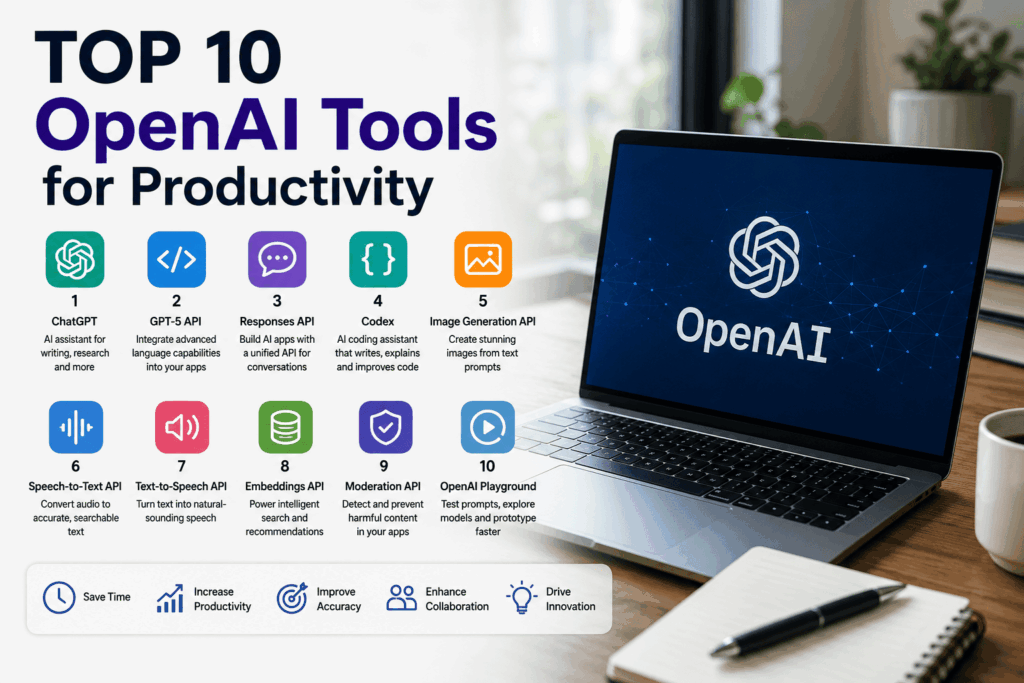
- Top 10 OpenAI Productivity Tools
- Best Practices
- Frequently Asked Questions
- Final Thoughts
Why AI Productivity Matters
Today’s professionals spend a significant portion of their day on repetitive tasks such as:
- Writing emails
- Preparing reports
- Searching for information
- Creating presentations
- Organizing documents
- Answering customer questions
- Scheduling work
- Coding repetitive functions
These activities are necessary, but they often reduce the time available for strategic thinking, creativity, and decision-making.
OpenAI tools help automate many of these tasks, allowing people to focus on higher-value work while maintaining quality and consistency.
Benefits of OpenAI Productivity Tools
Organizations using AI effectively often experience improvements across several areas.
Save Time
AI can generate first drafts, summarize long documents, organize meeting notes, and answer routine questions in seconds.
Improve Collaboration
Shared AI assistants make it easier for teams to access company knowledge, document processes, and maintain consistent communication.
Increase Output Quality
AI helps improve grammar, structure, clarity, and organization while reducing repetitive editing work.
Scale Operations
Businesses can support larger workloads without proportionally increasing staffing by automating routine workflows.
Support Better Decision-Making
AI can summarize reports, compare information, and surface key insights, helping leaders review complex information more efficiently.
Tool #1: ChatGPT
ChatGPT is OpenAI’s conversational AI assistant and one of the most widely used productivity tools available today.
It helps users generate ideas, write content, summarize information, answer questions, brainstorm solutions, analyze documents, and assist with countless day-to-day tasks.
Key Features
- Natural language conversations
- Content creation
- Document summarization
- Brainstorming
- Coding assistance
- Research support
- Business writing
- Learning and education
Best For
- Professionals
- Business owners
- Students
- Marketers
- Developers
- Customer support teams
- Consultants
Productivity Benefits
- Draft emails in minutes.
- Create reports more quickly.
- Summarize lengthy documents.
- Generate meeting agendas.
- Improve written communication.
- Brainstorm creative ideas.
- Explain complex topics in simple language.
Example
A marketing manager can use ChatGPT to create campaign ideas, draft blog posts, write social media content, and refine customer emails—all within a single workflow.
Tool #2: GPT-5 API
The GPT-5 API allows developers to integrate OpenAI’s advanced language capabilities directly into their own applications and business systems.
Instead of using AI manually, organizations can embed AI into customer-facing products and internal workflows.
Key Features
- Advanced language understanding
- High-quality text generation
- Strong reasoning
- Coding support
- Workflow automation
- Structured outputs
- Scalable integrations
Best For
- SaaS platforms
- Enterprise software
- Internal business tools
- Customer service systems
- AI-powered applications
Productivity Benefits
- Automate repetitive communication.
- Enhance customer support.
- Build intelligent assistants.
- Improve operational efficiency.
- Reduce manual processing.
Example
A software company can integrate the GPT-5 API into its customer portal to provide AI-powered support, generate documentation, and answer technical questions instantly.
Tool #3: Responses API
The Responses API simplifies the development of AI-powered applications by providing a unified interface for handling prompts, conversations, and structured outputs.
It enables developers to build reliable AI experiences with less complexity than managing multiple separate integrations.
Key Features
- Unified API interface
- Conversation management
- Structured responses
- Tool integration
- Flexible application workflows
- Scalable architecture
Best For
- AI application developers
- Enterprise software teams
- Workflow automation
- Customer support platforms
- Internal productivity tools
Productivity Benefits
- Reduce development complexity.
- Accelerate product launches.
- Simplify AI integration.
- Improve application consistency.
- Support scalable AI workflows.
Example
A project management platform can use the Responses API to generate task summaries, answer project-related questions, and automate status updates for distributed teams.
Quick Comparison
Tool Best For Primary Benefit
ChatGPT Everyday productivity Writing, research, and brainstorming
GPT-5 API AI-powered applications Advanced language capabilities
Responses API AI software development Simplified AI integration
Key Takeaways
The first three OpenAI productivity tools cover a wide range of everyday and enterprise needs:
ChatGPT helps individuals and teams work faster by generating content, summarizing information, and assisting with research and communication.
GPT-5 API enables businesses to build intelligent AI features directly into their products and workflows.
Responses API streamlines AI application development by providing a flexible foundation for conversational and structured AI experiences.
These tools are excellent starting points for anyone looking to improve productivity with OpenAI, whether you’re an individual professional or part of a large organization.
Part 2: Tools 4–6
While ChatGPT and OpenAI’s APIs help automate writing, communication, and AI-powered workflows, productivity extends beyond text. Developers, designers, marketers, and business teams also need tools for coding, visual content creation, and managing spoken information.
The next three OpenAI tools help eliminate repetitive work in these areas, allowing teams to produce higher-quality results more efficiently.
Tool #4: Codex
Codex is OpenAI’s coding-focused tool designed to help developers write, understand, debug, and improve software more efficiently.
Instead of replacing software engineers, Codex acts as an AI coding assistant that speeds up development and reduces repetitive programming tasks.
Key Features
- Code generation
- Code explanation
- Bug identification
- Code refactoring suggestions
- Documentation assistance
- Unit test generation
- Multi-language programming support
Best For
- Software developers
- Engineering teams
- Technical startups
- IT departments
- Programming students
Productivity Benefits
- Reduce repetitive coding.
- Generate boilerplate code quickly.
- Improve code documentation.
- Speed up debugging.
- Assist with learning unfamiliar programming languages.
- Increase developer productivity.
Example
A software engineer building a REST API can use Codex to generate endpoint templates, explain existing code, create unit tests, and recommend improvements, allowing more time for solving business-specific problems.
Tool #5: Image Generation API
Creating high-quality visuals often requires significant time and design resources. The Image Generation API enables businesses and developers to generate images from text prompts, making visual content creation faster and more accessible.
This tool is particularly valuable for marketing teams, content creators, and product designers who need custom visuals at scale.
Key Features
- AI-generated images
- Marketing graphics
- Product illustrations
- Concept art
- Creative brainstorming
- Image editing
- Style variations
Best For
- Marketing teams
- Graphic designers
- Content creators
- E-commerce businesses
- Advertising agencies
- Product development teams
Productivity Benefits
- Accelerate content creation.
- Produce custom visuals on demand.
- Support rapid design iterations.
- Reduce reliance on stock images.
- Enable creative experimentation.
Example
A marketing team launching a new product can generate multiple campaign concepts for social media, blog posts, and digital advertisements before refining the final creative assets.
Tool #6: Speech-to-Text API
Meetings, interviews, webinars, podcasts, and customer calls contain valuable information, but manually transcribing audio is time-consuming.
The Speech-to-Text API converts spoken language into searchable text, making it easier to organize information and automate documentation.
Key Features
- transcription
- Meeting notes
- Interview transcription
- Podcast conversion
- Voice recognition
- Searchable transcripts
- Multilingual support
Best For
- Business teams
- Journalists
- Researchers
- Customer support centers
- Healthcare administrators
- Legal professionals
- Content creators
Productivity Benefits
- Save hours on manual transcription.
- Improve documentation accuracy.
- Create searchable records.
- Generate meeting summaries.
- Support accessibility initiatives.
Example
After a one-hour project meeting, the audio can be transcribed automatically, allowing AI to generate action items, meeting summaries, and follow-up tasks for the team.
Combining These Tools
Many organizations achieve even greater productivity by using these tools together.
Example Workflow
A software company could:
- Use the Speech-to-Text API to transcribe customer interviews.
- Ask ChatGPT to summarize customer feedback.
- Use Codex to implement requested features.
- Generate product illustrations with the Image Generation API.
- Publish updates through an AI-powered workflow built using the GPT-5 API.
This integrated approach reduces manual work across multiple departments.
Quick Comparison
Tool Best For Primary Benefit
Codex Software development Faster coding and debugging
Image Generation API Creative content Custom visual creation
Speech-to-Text API Audio workflows Automatic transcription
Key Takeaways
These three tools expand OpenAI’s productivity ecosystem beyond text generation:
Codex helps developers write, understand, and improve code more efficiently.
Image Generation API enables businesses to create custom visuals for marketing, design, and product development.
Speech-to-Text API transforms spoken conversations into searchable text, improving documentation and collaboration.
Together, they help teams streamline software development, creative production, and communication workflows while reducing repetitive manual tasks.
Part 3: Tools 7–10
The final four tools complete OpenAI’s productivity ecosystem by helping organizations build more accessible applications, improve information retrieval, create safer AI experiences, and accelerate AI development through rapid experimentation.
Whether you’re building enterprise software, launching an AI startup, or improving internal workflows, these tools can help teams work smarter and deliver better user experiences.
Tool #7: Text-to-Speech API
The Text-to-Speech (TTS) API converts written content into natural-sounding speech, enabling businesses to create voice experiences without recording human narration for every update.
It is particularly useful for accessibility, customer engagement, and voice-enabled applications.
Key Features
- Natural voice generation
- Multiple voice options
- Audio content creation
- Accessibility support
- Voice assistants
- Educational narration
- Customer service automation
Best For
- E-learning platforms
- Customer support systems
- Accessibility solutions
- Mobile applications
- Podcast production
- Voice-enabled products
Productivity Benefits
- Produce audio content quickly.
- Improve accessibility for users with visual impairments.
- Create multilingual voice experiences.
- Reduce voice recording costs.
- Automate narration for digital content.
Example
A training platform can automatically convert written lessons into audio, giving learners the flexibility to listen during commutes or while multitasking.
Tool #8: Embeddings API
The Embeddings API transforms text into numerical representations that allow applications to understand semantic relationships between pieces of information.
While users rarely interact with embeddings directly, they power many intelligent features behind the scenes.
Key Features
- Semantic search
- Knowledge retrieval
- Document similarity
- Recommendation systems
- Content organization
- AI-powered search
- Vector-based retrieval
Best For
- Enterprise knowledge bases
- AI search engines
- Customer support portals
- Research platforms
- Document management systems
Productivity Benefits
- Improve search accuracy.
- Help employees find information faster.
- Reduce duplicate work.
- Enhance recommendation systems.
- Support retrieval-augmented AI applications.
Example
Instead of matching exact keywords, an enterprise knowledge portal can understand that “vacation policy” and “paid time off guidelines” refer to similar concepts, making search results more relevant.
Tool #9: Moderation API
Organizations deploying AI applications need systems that help identify potentially harmful, inappropriate, or policy-violating content.
The Moderation API helps developers build safer applications by automatically evaluating text and other supported inputs against predefined safety categories.
Key Features
- Content safety checks
- Automated moderation
- User-generated content filtering
- Risk detection
- Platform protection
- Scalable moderation workflows
Best For
- Online communities
- Social platforms
- Customer support
- Educational products
- Enterprise AI applications
Productivity Benefits
- Reduce manual moderation.
- Improve user safety.
- Support compliance efforts.
- Protect brand reputation.
- Scale content review processes.
Example
A community platform can automatically review user submissions before publication, allowing moderators to focus on more complex cases.
Tool #10: OpenAI Playground
The OpenAI Playground provides an interactive environment where developers and technical teams can test prompts, experiment with models, and prototype AI solutions before integrating them into production applications.
It offers a simple way to evaluate different prompting strategies and compare outputs without writing a full application.
Key Features
- Prompt testing
- Model experimentation
- Rapid prototyping
- Parameter tuning
- Output comparison
- Development workflows
Best For
- Developers
- Product managers
- AI researchers
- Technical teams
- Startup founders
Productivity Benefits
- Speed up experimentation.
- Improve prompt quality.
- Validate ideas before development.
- Reduce implementation risk.
- Accelerate AI adoption.
Example
Before launching an AI customer support assistant, a product team can test multiple prompt variations in the Playground to determine which approach produces the most helpful and consistent responses.
Complete Productivity Stack
Many organizations combine multiple OpenAI tools into a unified workflow.
Example Enterprise Workflow
A customer submits a voice message.
- The Speech-to-Text API converts it into text.
- The Embeddings API retrieves relevant knowledge base articles.
- The GPT-5 API generates a personalized response.
- The Moderation API evaluates the interaction for safety.
- The Text-to-Speech API delivers the response as natural audio.
- The development team refines prompts using the OpenAI Playground.
This integrated workflow demonstrates how OpenAI’s tools can work together to automate complex business processes while improving customer and employee experiences.
Quick Comparison
Tool Best For Primary Benefit
Text-to-Speech API Voice applications Natural audio generation
Embeddings API Intelligent search Semantic understanding
Moderation API AI safety Content filtering
OpenAI Playground AI development Prompt testing and prototyping
Key Takeaways
The final four tools strengthen OpenAI’s productivity ecosystem by addressing accessibility, search, safety, and development workflows:
Text-to-Speech API makes applications more accessible and enables voice-based experiences.
Embeddings API powers intelligent search and knowledge retrieval.
Moderation API helps organizations build safer AI-powered products.
OpenAI Playground allows teams to experiment, refine prompts, and prototype AI features before deployment.
Together with ChatGPT, GPT-5 API, Responses API, Codex, Image Generation API, and Speech-to-Text API, these tools provide a comprehensive foundation for improving productivity across individuals, startups, and enterprise organizations.
Part 4: Choosing the Right Tool, Best Practices & FAQs
By now, you’ve seen how OpenAI offers much more than a single chatbot. Its ecosystem includes conversational AI, developer APIs, coding assistants, image generation, voice technologies, intelligent search, safety tools, and rapid prototyping environments.
The next step is understanding how to choose the right tool for your specific goals and how to implement AI successfully within your organization.
How to Choose the Right OpenAI Tool
Different productivity challenges require different AI capabilities. Selecting the right tool depends on your workflow, technical requirements, and business objectives.
For Everyday Productivity
If your primary goal is improving day-to-day work, ChatGPT is often the best place to start.
Ideal tasks include:
- Writing emails
- Brainstorming ideas
- Creating reports
- Summarizing documents
- Research assistance
- Meeting preparation
- For Software Development
Development teams benefit from combining several OpenAI tools.
Recommended stack:
- GPT-5 API
- Responses API
- Codex
- OpenAI Playground
Together, these tools support coding, testing, documentation, debugging, prompt engineering, and AI-powered application development.
For Marketing Teams
Marketing professionals can use OpenAI to accelerate nearly every stage of content production.
Recommended tools:
- ChatGPT
- Image Generation API
- GPT-5 API
Common applications:
- Blog writing
- SEO optimization
- Social media campaigns
- Email marketing
- Advertising copy
- Landing page creation
For Customer Support
Organizations handling large volumes of customer inquiries can improve efficiency using:
- GPT-5 API
- Responses API
- Speech-to-Text API
- Text-to-Speech API
- Moderation API
These tools help automate conversations while maintaining high-quality customer experiences.
For Enterprise Knowledge Management
Large organizations often need employees to access information quickly.
Recommended tools:
- Embeddings API
- GPT-5 API
- ChatGPT
This combination enables AI-powered search, document summarization, and intelligent knowledge assistants.
Productivity Workflows by Industry
Healthcare
Use AI to assist with:
- Administrative documentation
- Appointment summaries
- Internal knowledge search
- Patient communication drafts
Healthcare professionals should always review AI-generated content before it is used in clinical or administrative decisions.
Financial Services
Improve productivity through:
- Report summarization
- Invoice processing support
- Compliance documentation
- Financial analysis drafts
Human review remains essential for financial reporting and regulatory compliance.
Education
Educational institutions can use OpenAI for:
- Lesson planning
- Student feedback
- Learning materials
- Accessibility
- Research assistance
E-commerce
Retail businesses commonly use OpenAI for:
- Product descriptions
- Customer support
- Marketing campaigns
- FAQ automation
- Inventory documentation
Software Companies
Development organizations frequently combine:
- Codex
- GPT-5 API
- Responses API
- Playground
This workflow accelerates software delivery while improving documentation and developer productivity.
Best Practices for Maximum Productivity
Start Small
Rather than attempting to automate every process, begin with one or two high-impact workflows.
Examples include:
- Customer support
- Internal documentation
- Marketing content
- Meeting summaries
Pilot projects help teams measure value before expanding AI across the organization.
Define Success Metrics
Measure improvements using business-focused metrics such as:
- Time saved
- Customer satisfaction
- Employee productivity
- Cost reduction
- Response time
- Content production speed
- User adoption
Clear metrics make it easier to evaluate return on investment.
Train Employees
Successful AI adoption depends on people as much as technology.
Provide guidance on:
- Prompt writing
- Reviewing AI outputs
- Responsible AI use
- Data privacy
- Company policies
Well-trained employees are more likely to use AI effectively and responsibly.
Keep Humans in the Loop
AI should support decision-making, not replace it.
Human oversight is especially important for:
- Legal content
- Financial reports
- Medical information
- Executive communications
- Compliance documentation
Continuously Optimize
AI workflows improve over time.
Regularly review:
- Prompt quality
- API usage
- Costs
- Employee feedback
- Customer feedback
- Productivity metrics
Continuous improvement helps maximize long-term value.
Common Mistakes to Avoid
Organizations new to AI often make avoidable errors.
Common mistakes include:
- Choosing the wrong tool for the task.
- Expecting AI to replace professional expertise.
- Skipping review of AI-generated content.
- Ignoring employee training.
- Overlooking security and privacy requirements.
- Measuring activity instead of business outcomes.
- Failing to update prompts as workflows evolve.
Avoiding these mistakes leads to stronger adoption and better results.
Frequently Asked Questions
Which OpenAI tool is best for beginners?
ChatGPT is the easiest starting point for most individuals and businesses because it requires little technical setup and supports a wide range of productivity tasks.
Which tools are best for developers?
Developers often benefit from GPT-5 API, Responses API, Codex, and OpenAI Playground for building, testing, and deploying AI-powered applications.
Can small businesses use OpenAI?
Yes. Many small businesses use ChatGPT for content creation, customer communication, and administrative work, then expand to APIs as their needs grow.
Are OpenAI tools suitable for enterprises?
Yes. Many enterprises integrate OpenAI into customer support, internal knowledge systems, software development, marketing, and workflow automation while implementing governance and security controls.
Can multiple OpenAI tools work together?
Absolutely. Many organizations combine several tools to create end-to-end AI workflows that automate communication, search, coding, content creation, and customer interactions.
Complete Comparison Table
Tool Primary Purpose Best For
ChatGPT Everyday AI assistant Professionals and businesses
GPT-5 API AI application development Developers and enterprises
Responses API Unified AI integration SaaS and workflow automation
Codex Coding assistance Software engineering
Image Generation API Visual content creation Marketing and design
Speech-to-Text API Audio transcription Meetings and documentation
Text-to-Speech API Voice generation Accessibility and voice apps
Embeddings API Semantic search Knowledge management
Moderation API AI safety User-generated content
OpenAI Playground Prompt testing AI development and experimentation
Final Thoughts
OpenAI’s growing ecosystem of productivity tools enables individuals and organizations to work smarter, automate repetitive tasks, and build intelligent applications that improve efficiency across every department.
Whether you’re writing content with ChatGPT, integrating AI into software using the GPT-5 API, generating visuals, transcribing meetings, or building enterprise knowledge assistants, each tool addresses a different productivity challenge.
The most successful organizations don’t rely on a single AI solution. Instead, they combine multiple OpenAI tools into integrated workflows that streamline operations, support employees, and deliver better experiences for customers.
As AI technology continues to evolve, businesses that invest in responsible implementation, employee training, and continuous optimization will be well-positioned to increase productivity, encourage innovation, and remain competitive in a rapidly changing digital landscape.
